Zero trust rules guide

Analyze traffic, design rules, and enforce least privilege with GreenGateway.

This guide explains how to use GreenGateway from first setup through daily ruleset review. It is written for engineers who need a low-friction path to deploy GG in an organization, understand each admin feature, and turn observed API or MCP traffic into clear, testable, least-privilege rules.

Overview

GreenGateway is a self-hosted control point for HTTP APIs and MCP servers. It sits between clients and upstream services, authenticates callers, evaluates policy, records audit data, discovers traffic patterns, and gives operators a visual workflow for creating and reviewing rules.

What GG protects

HTTP routes, gateway-owned admin APIs, MCP tool listing and tool calls, outbound tool runtime requests, and service-token access.

What GG records

Authenticated principal identity, request path, endpoint template, policy result, audit event type, status, latency, and discovery signals.

What operators do

Observe traffic, identify identities and roles, preview rules against history, deploy in shadow mode, promote safe rules, and roll back mistakes.

Core idea

Do not start by writing a large policy from guesses. Start by collecting real traffic, mapping who uses what, converting that evidence into small rules, and using preview plus shadow review before blocking production traffic.

Setup

The fastest local path is the development stack. It starts GG with a checked-in JWKS fixture, a sample echo upstream, the admin UI, RBAC policy, audit storage, and discovery storage.

  1. Install Rust, Node.js, npm, and Docker if you plan to use the compose stack.
  2. Start the development stack from the repository root.
  3. Generate traffic so the admin UI has audit and discovery data to analyze.
  4. Open the admin UI and sign in with an operator token or SSO when configured.
docker compose -f docker-compose.yml -f docker-compose.dev.yml up --build

GREENGATEWAY_BASE_URL=http://127.0.0.1:8080 node scripts/generate-traffic.mjs --smoke-test

open http://127.0.0.1:8080/admin

Local port note

Some local sessions run GG on a non-default port such as 18080. Use the actual gateway URL for the admin UI and for GREENGATEWAY_BASE_URL.

Minimum production settings

Goal Important settings Why it matters
Authenticate callers AUTH_PROVIDERS, JWT_JWKS_URL, JWT_ISSUER, JWT_AUDIENCE GG needs a trusted identity source before rules can be identity-aware.
Load policy POLICY_FILE The policy file contains roles, route permissions, and direct firewall rules.
Store audit history AUDIT_SQLITE_PATH Audit history powers log review, live context, policy preview, and rule hit counts.
Discover endpoints DISCOVERY_SQLITE_PATH Endpoint inventory, signals, rule suggestions, and traffic detail depend on discovery storage.
Track principals PRINCIPAL_SQLITE_PATH The identity directory needs a principal store to show users, bots, and their activity.
Manage service tokens SERVICE_TOKEN_SQLITE_PATH The tokens UI needs a token store to create, revoke, and rotate gateway service tokens.

Zero Trust Methodology

Zero trust in GG means every route and tool should have a reason to be reachable by a specific identity, role, or service token. Rules should be evidence-driven, narrow, previewed, and reversible.

The analysis loop

  1. Inventory real traffic from the Traffic, Logs, Live, Signals, and Identities pages.
  2. Group endpoints by business capability, sensitivity, method, and principal type.
  3. Identify expected roles, service accounts, and abnormal access patterns.
  4. Create small candidate rules and preview them against historical traffic.
  5. Deploy uncertain rules as shadow before using deny.
  6. Review would-deny evidence, then promote, disable, or rewrite the rule.
  7. Use policy history and rollback when a policy change behaves differently than expected.

Decision questions

  • Which authenticated principal or role needs this endpoint?
  • Is the method safe to allow, or should reads and writes be split?
  • Is the path pattern narrow enough to avoid accidental broad access?
  • Does this need allow, deny, or shadow first?
  • What historical traffic would this rule match?
  • What signal or audit event would prove the rule is wrong?
  • How do we roll back if this blocks legitimate work?

Rule-writing standard

A rule is not ready because it "looks right." It is ready when the preview output, endpoint detail, identity context, and shadow review data support the decision.

Ruleset Model

GG policy has two main layers: route-level admin permissions and direct firewall rules for proxied API or MCP traffic. The admin UI itself uses the same protected API surface as any other client.

Concept How it works Operator guidance
default_action Defines what happens when no enabled direct rule matches. Use deny-by-default for mature enforcement. Use a careful rollout path when migrating existing traffic.
First match wins Direct rules are evaluated in order. The first enabled rule that matches decides the action. Put narrow exceptions above broad rules. Review ordering after every drag-reorder.
allow Permits matching traffic. Use for known-good identities, methods, and endpoint templates.
deny Blocks matching traffic. Use after evidence is clear, or for high-confidence abuse patterns.
shadow Records would-deny decisions without blocking the request. Use for new restrictions, uncertain anomaly response, and production rollout checks.
Principal matchers Rules can match roles, subject, auth method, or related principal fields. Prefer roles for human access and subject/service-token matching for narrow machine access.
ETags Policy writes are guarded to avoid overwriting concurrent changes. If a save conflicts, reload policy, re-check the diff, and save again only if the intent still holds.

Use Cases

Each use case maps one admin page to the operational decision it supports. Use these as a junior-friendly runbook when onboarding a new service or reviewing an existing ruleset.

1. Authenticate the admin UI

The Token dashboard stores the operator bearer token in browser session storage for the current admin session. It is also the fallback when SSO is not configured.

Requires: an operator token whose roles map to the admin permissions for the pages you need. Human operators should normally use an IdP token or SSO. Service tokens are mainly for machines; use them for admin UI access only in controlled break-glass or local-development cases.

  1. Open /admin.
  2. Paste the operator bearer token from your IdP, SSO callback, or documented local-dev minting process.
  3. Select Save, then open a protected page such as Status or Logs.
  4. Confirm success by seeing page data instead of 401. If the page says permission required, the token is valid but the role lacks that admin permission.
  5. Use Clear before handing off a browser or changing operator identity.
Purpose: operator auth Storage: session only Fallback for SSO

Zero trust check

If a page says the token is valid but lacks permission, fix the role-to-permission mapping instead of giving broad access by habit.
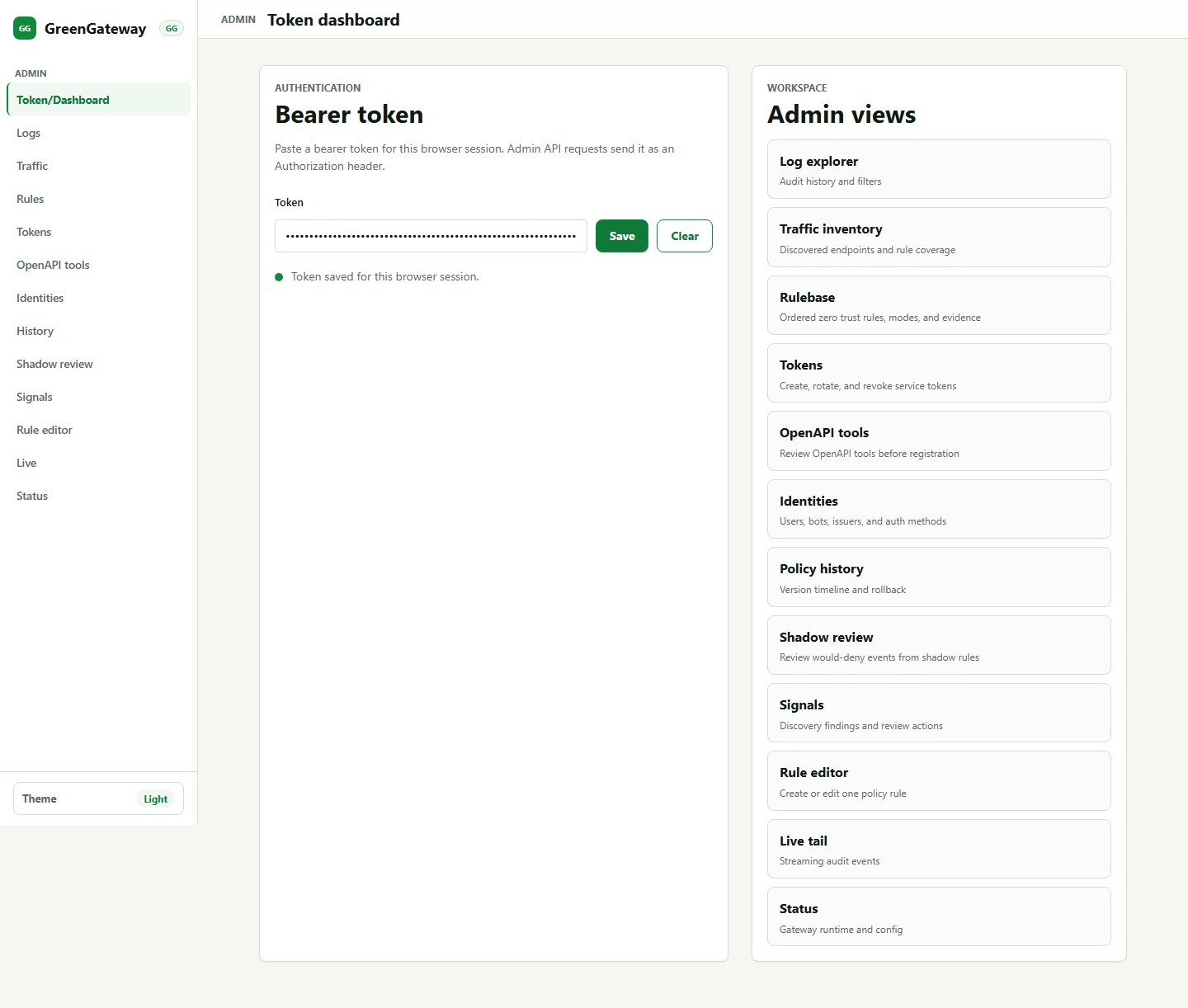
GreenGateway token dashboard showing token save and admin navigation
Token dashboard: the token field, Save/Clear controls, and protected admin navigation are the operator entry point.

2. Validate runtime status

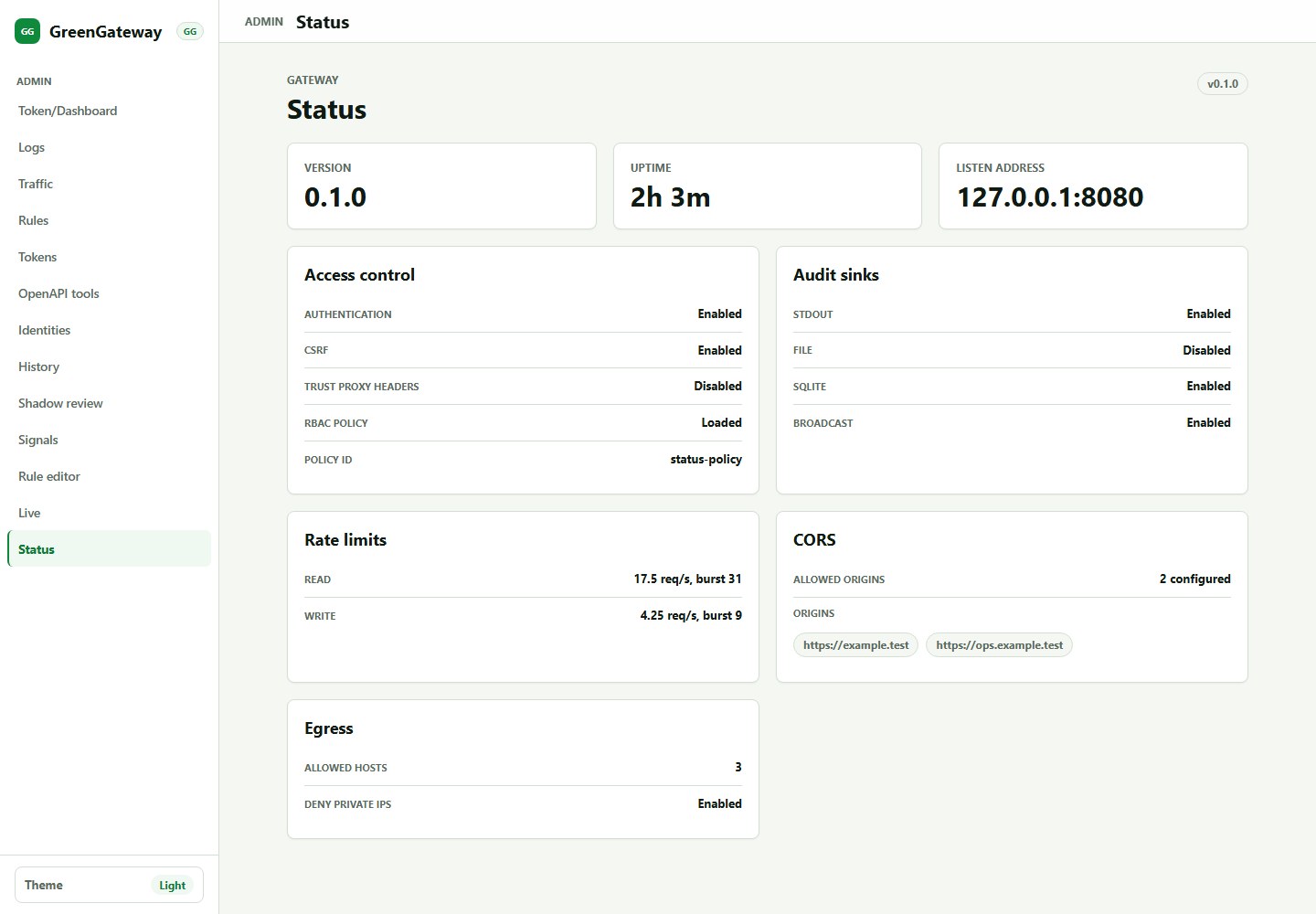
Status shows the runtime values exposed by the current build: version, uptime, listener address, authentication, CSRF, RBAC, rate limits, audit sinks, CORS, egress, and related health indicators.

Requires: a saved admin token with status-read permission and a deployment checklist of the values you expect to see.

  1. Open /admin/status, or choose Status from the sidebar.
  2. Confirm the expected listener, auth mode, and RBAC state; confirm the admin prefix from deployment config if it is not shown in Status.
  3. Confirm audit sinks before relying on Logs, policy preview, or hit counts.
  4. For discovery, token, and principal storage, also check the feature page state and the matching environment variables in configuration.

Common finding

A UI page can be correct and still empty if its backing store is disabled. Check Status before assuming the feature is broken.

GreenGateway status page showing version, uptime, and access control settings
Status: verify visible runtime panels before diagnosing policy or feature behavior.

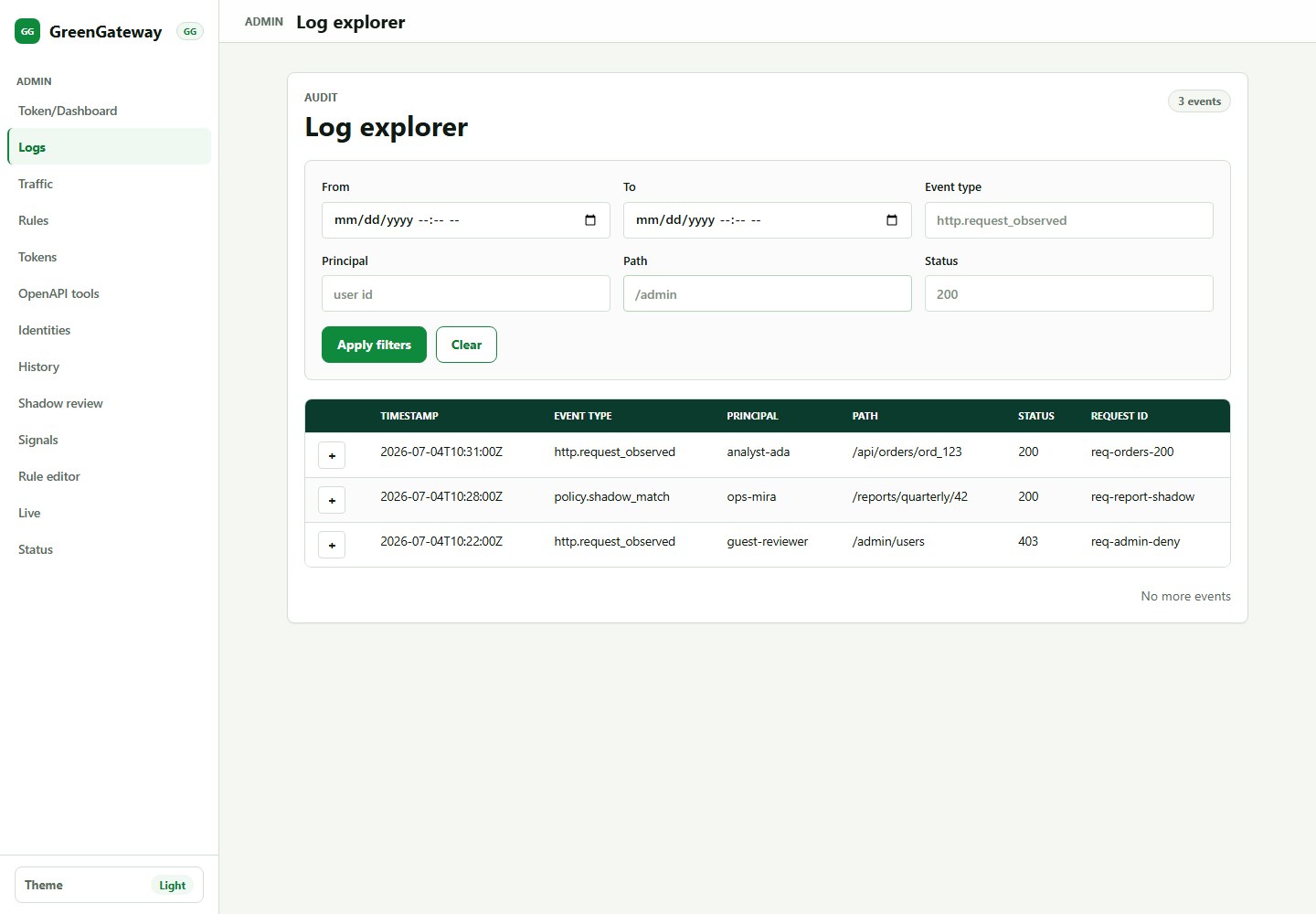
3. Analyze audit logs

Log Explorer is the queryable, retention-bounded audit record. Use it to answer who did what, which policy decision was made, and what status code the gateway returned.

Requires: AUDIT_SQLITE_PATH, representative traffic, and an admin token with audit-read permission.

  1. Open Logs from the sidebar and start with broad filters.
  2. Narrow by path, status, actor, or event type after you see matching rows.
  3. Expand a row and compare principal, path, status, and policy decision evidence.
  4. Copy the request ID into follow-up searches to correlate request, auth, and authz events.

Rule analysis use

Use logs to prove whether a candidate rule would affect real users, scanners, bots, or only expected service accounts.

GreenGateway log explorer showing filters and audit events
Log Explorer: filters and audit rows help you collect evidence before changing access policy.

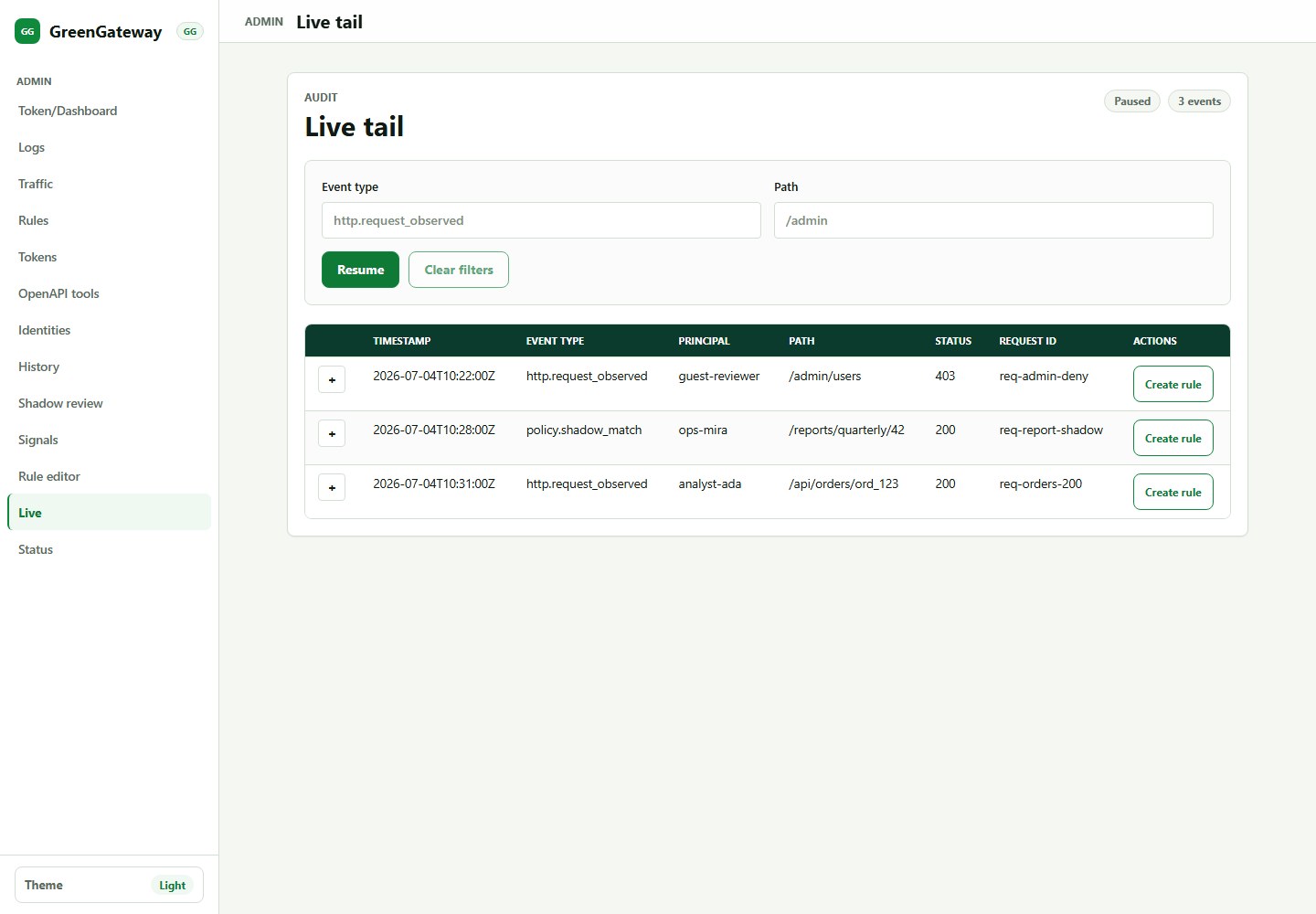
4. Watch live traffic

Live Tail streams audit events over SSE so an operator can watch authentication, authorization, proxy, MCP, and signal activity while testing.

Requires: a saved admin token with event-stream read permission and browser/network access to the admin event stream.

  1. Open /admin/live, or choose Live from the sidebar.
  2. Confirm the connection status shows the stream is connected before generating test traffic.
  3. Filter by event type or path shown in the controls when validating one workflow.
  4. Use event-row rule actions where available; if the screenshot does not show them, scroll horizontally or use Traffic Detail for a clearer create-rule path.

Use with care

Live Tail is for immediate feedback. For policy evidence, use Log Explorer and Traffic Detail because they are easier to review later.

GreenGateway live tail page showing event stream controls
Live Tail: connection state, filters, and event rows show request decisions as they happen.

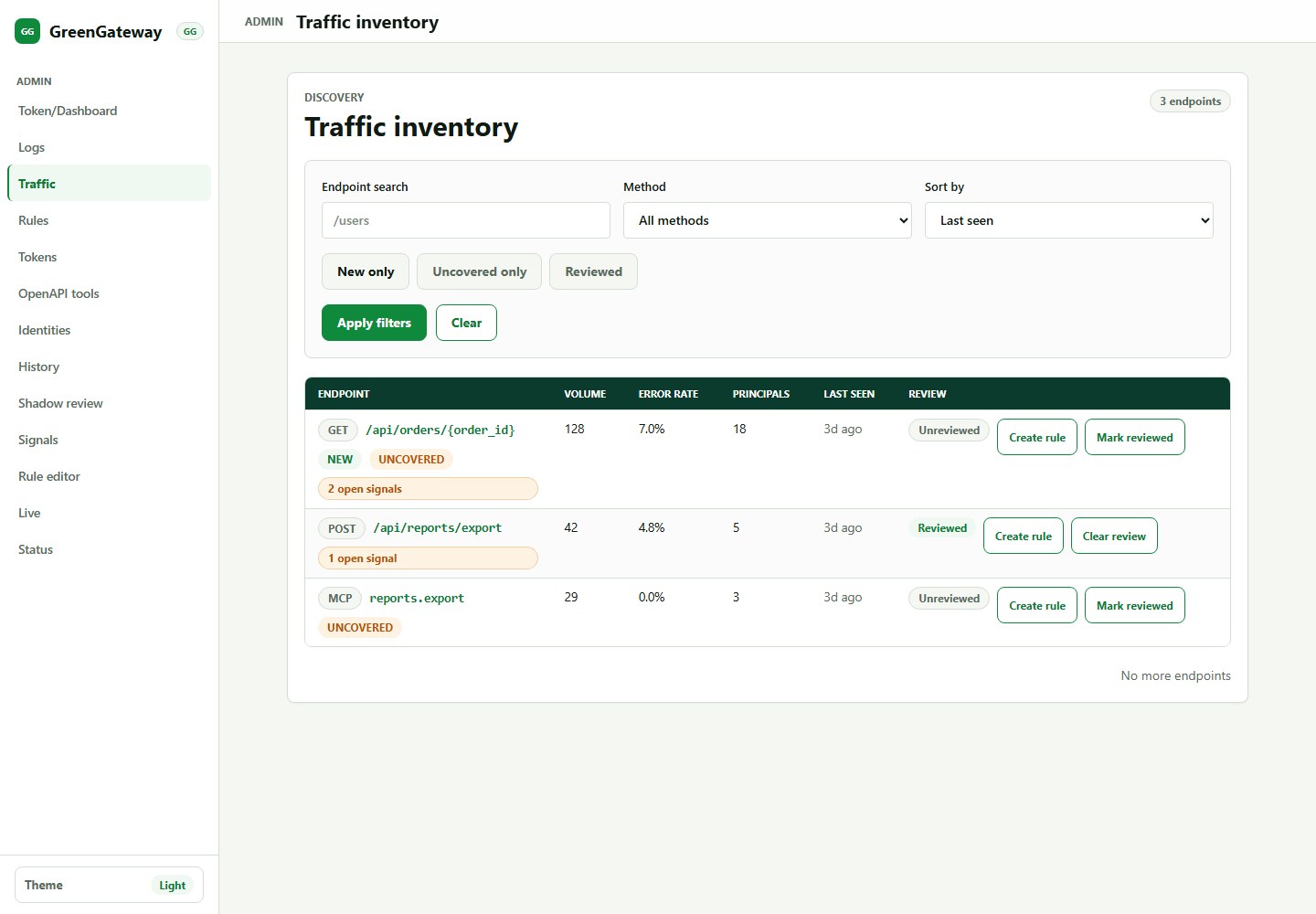
5. Build endpoint inventory

Traffic Inventory groups observed requests into stable endpoint templates. It shows call volume, principal count, latency, error rate, review state, lifecycle badges, signal badges, and rule coverage.

Requires: DISCOVERY_SQLITE_PATH, traffic through GG, and an admin token that can read traffic inventory.

  1. Use New only and Uncovered only to focus first review work.
  2. Classify static asset noise such as /favicon.ico separately from business endpoints.
  3. Open an endpoint by selecting its path link, then inspect owner, purpose, methods, principals, errors, and signals.
  4. Mark endpoints reviewed only after ownership, expected callers, and a documented coverage or exception reason are known.

Zero trust check

Every important endpoint should eventually be covered by a rule or carry a documented exception with owner, reason, and review date.

GreenGateway traffic inventory showing discovered endpoints and filters
Traffic Inventory: find endpoints that need ownership, review, or rule coverage.

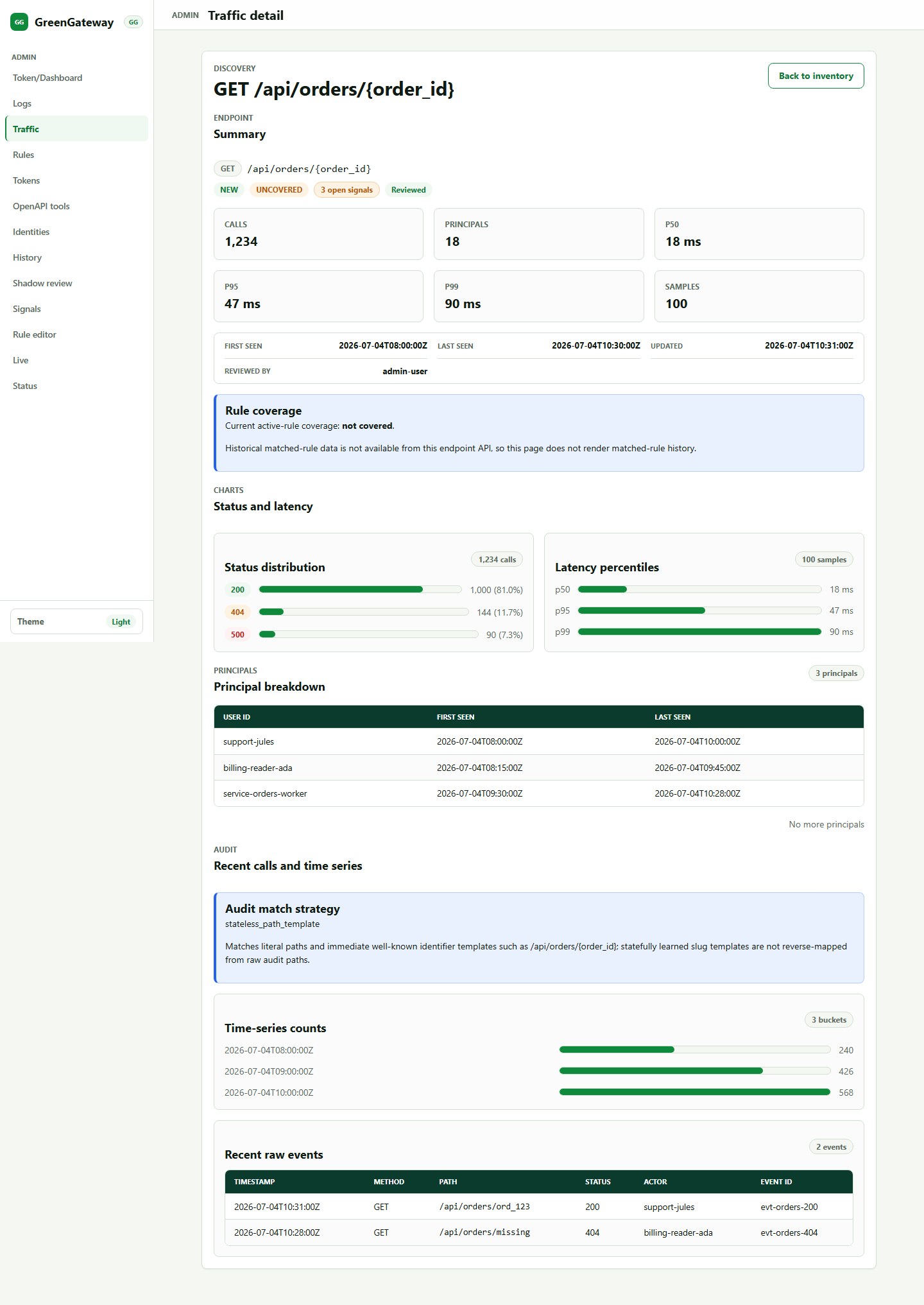
6. Review one endpoint deeply

Traffic Detail is the main endpoint-analysis page. It shows aggregate counts, status distribution, latency percentiles, principal breakdown, audit enrichment, recent events, schema/signals context, and create-rule shortcuts.

Requires: an observed endpoint, discovery storage, audit history for enrichment, and principal storage when identity breakdown matters.

  1. Open the endpoint path from Traffic Inventory.
  2. Check the Summary and Rule coverage area for uncovered or newly discovered status.
  3. Review the principal breakdown and recent events to identify expected callers.
  4. Investigate open signals, high error rates, schema mismatch counts, or new-principal evidence before writing policy.
  5. Create a rule from endpoint actions where available, or open Rule Editor with the method/path copied from this page.

Rule design hint

Split read and write methods. A role that can GET an endpoint rarely needs automatic access to POST, PUT, or DELETE.

GreenGateway traffic detail page for a proxied echo endpoint
Traffic Detail: this captured endpoint shows summary, coverage, principals, latency, and signal context for a proxied route.

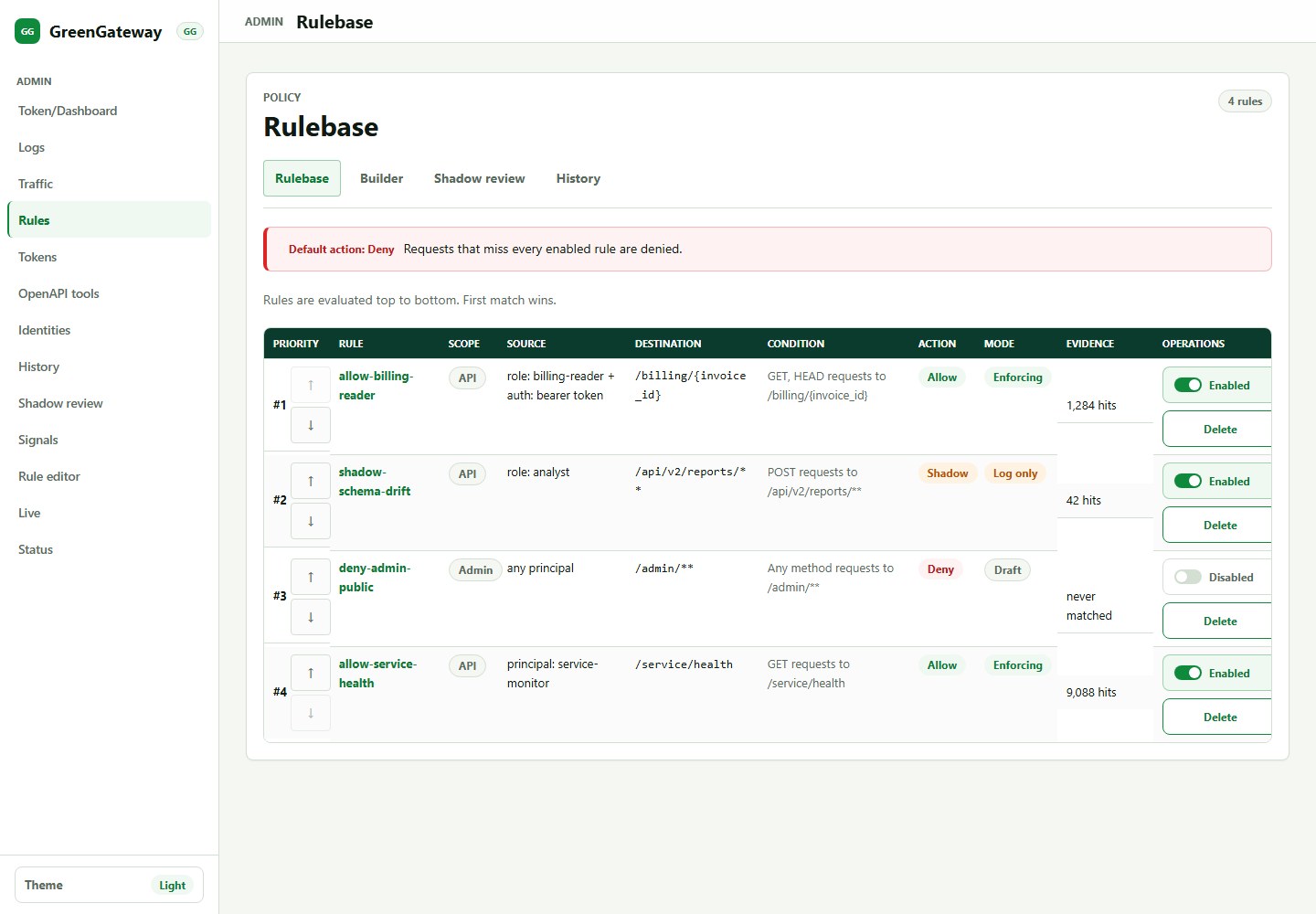
7. Review current rules

Rule Table is the visual policy inventory. When direct rules exist, it shows each rule, enabled state, action, principal matcher, target, methods, order, and hit counts backed by available audit history.

Requires: policy read permission. Mutations require policy write permission, and hit counts require audit history.

  1. Start at the default action banner and confirm the miss behavior.
  2. Review effective order top-down because the first enabled matching rule wins.
  3. Confirm narrow exceptions appear above broad catchall rules.
  4. Before disabling or deleting a stale-looking rule, check Policy History and audit-backed hit counts within your retention window.
  5. Use drag-reorder carefully because first-match-wins changes behavior.

Ordering risk

A correct rule in the wrong position can be ineffective or dangerous. Re-check preview and hit counts after reorder operations.

GreenGateway rule table showing demo allow, deny, and shadow rules with hit counts
Rule Table: demo data shows ordered allow, deny, and shadow rules with match scopes, principals, modes, and hit counts.

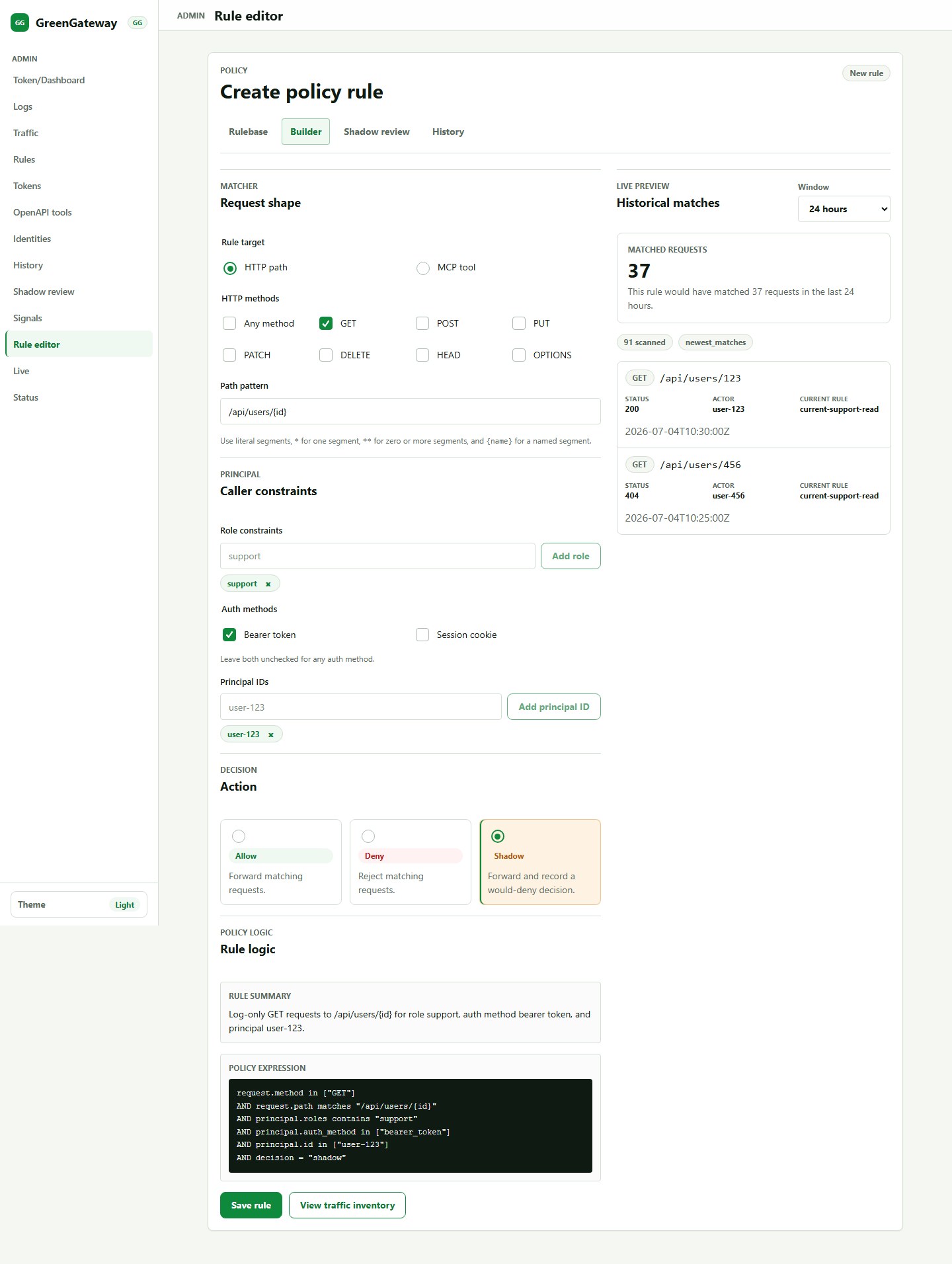
8. Create and preview rules

Rule Editor builds a candidate rule through form controls. The live preview checks historical traffic when audit history is enabled so you can see what the rule would match before saving.

Requires: policy write permission and enough audit history for preview results to be meaningful.

  1. Open /admin/policy/rules/editor, or choose Rule editor from the sidebar.
  2. Choose the action in the rule details area: allow, deny, or shadow.
  3. Set path or tool target, HTTP methods, and principal matcher.
  4. Wait for the automatic preview to refresh; an empty preview can mean no matching audit history, not necessarily an invalid rule.
  5. Save only when matched samples align with the rule intent, then verify the new version in Rule Table and Policy History.

Junior rule standard

Use a short rule description that names the business reason, not just the endpoint. Future reviewers need the intent.

GreenGateway rule editor showing visual matcher controls and preview panel
Rule Editor: matcher controls and preview output support narrow, evidence-backed rule creation.

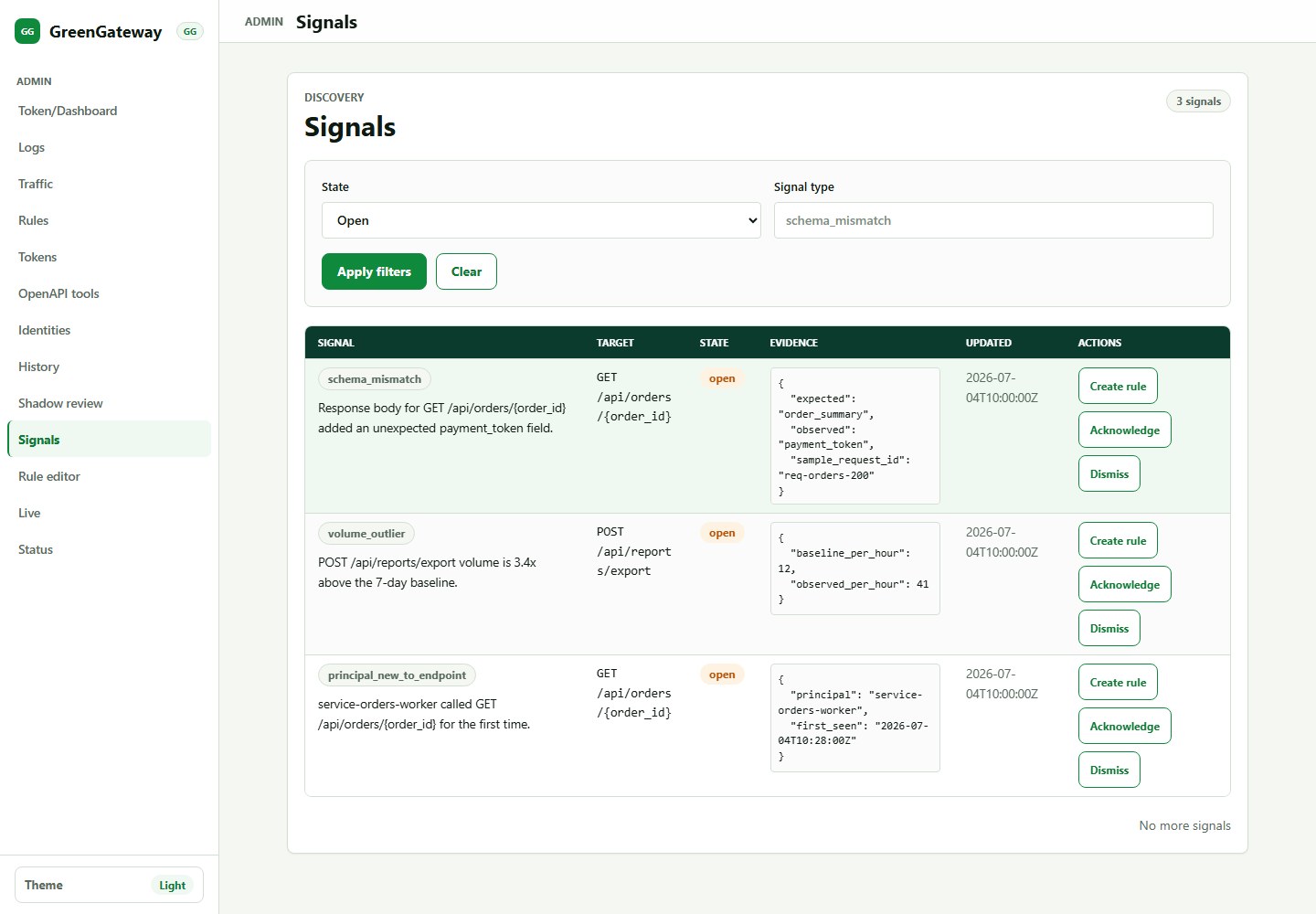
9. Triage anomaly signals

Signals are deterministic findings from discovery data: new endpoints, schema mismatch thresholds, error-rate spikes, new principals on existing endpoints, and volume outliers.

Requires: discovery storage, signal read permission, and write permission if you plan to acknowledge, dismiss, or create shadow rules.

  1. Filter to open signals first; open means the signal still needs investigation or a lifecycle decision.
  2. Read the evidence, target, affected principals, and lifecycle state before taking action.
  3. Acknowledge a signal when it is real enough to investigate but not ready to close.
  4. Dismiss noise only after recording the rationale in your issue, ticket, or change-review process.
  5. Before creating a shadow rule, verify the target endpoint, representative samples, recurrence, and expected service accounts.

Not ML

Signals are deterministic heuristics. Treat them as prompts for review, not proof of malicious activity.

GreenGateway signals page showing filters, evidence, and lifecycle actions
Signals: prioritize unusual traffic before turning it into policy.

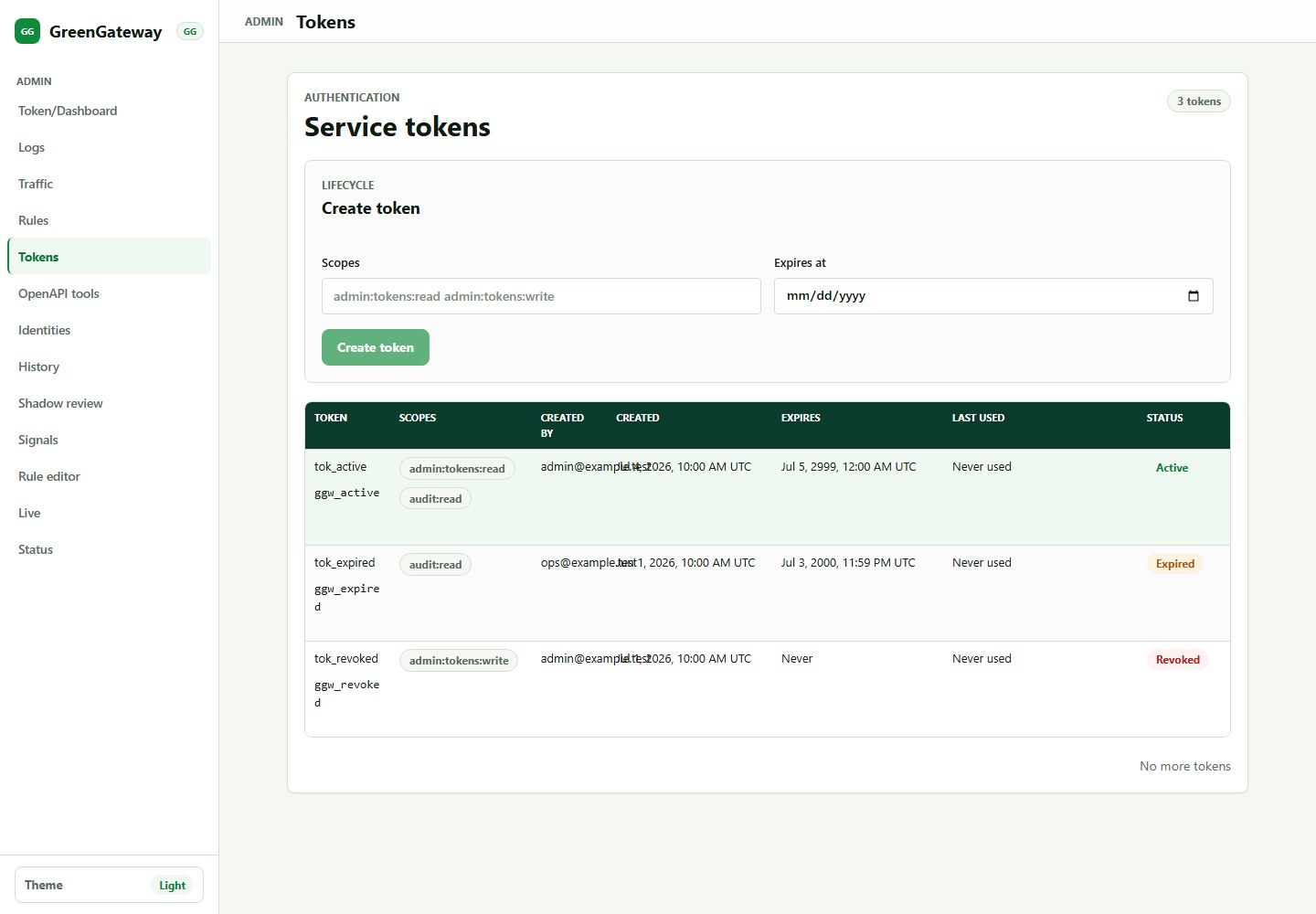
10. Manage service tokens

Tokens manages gateway-owned service tokens. Token secrets are hashed at rest, scoped, revocable, rotatable, and show plaintext only once at creation or rotation.

Requires: SERVICE_TOKEN_SQLITE_PATH, admin:tokens:read, and admin:tokens:write for mutations.

  1. Identify the machine principal and its required endpoints or MCP tools from Logs and Traffic Inventory.
  2. Create a token only for machines that cannot use the organization IdP.
  3. Assign only the scopes required by that machine workflow, such as MCP tool access or specific admin automation.
  4. Set expiration dates for temporary integrations and record the owner.
  5. Test the token against intended routes/tools, then verify unintended routes fail.
  6. Rotate tokens when ownership changes or exposure is suspected.

Permission dependency

The token UI requires token read/write permissions and SERVICE_TOKEN_SQLITE_PATH. A valid admin token can still be denied if policy lacks these permissions.

GreenGateway tokens page showing demo service tokens with scopes, expiry, and status
Tokens: demo data shows token creation controls plus active service tokens with scopes, expiry dates, last-used times, and status.

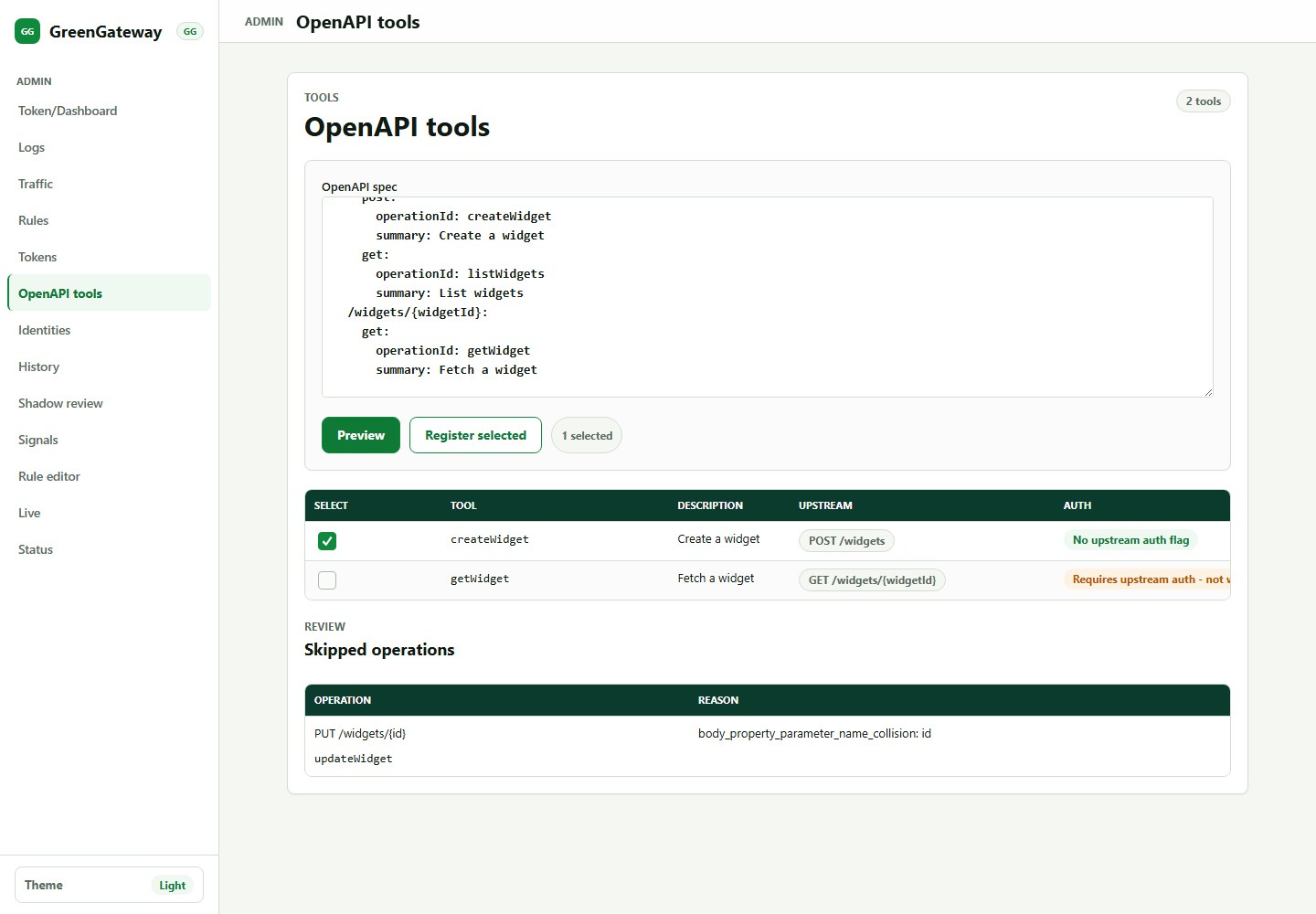
11. Generate MCP tools from OpenAPI

OpenAPI Tools previews and registers MCP tool definitions from an OpenAPI document. After registration and testing, generated tools can be governed through GG's auth, RBAC, audit, discovery, and tool-aware rule workflows.

Requires: tool registration permission, a valid OpenAPI 3.x JSON or YAML document, known upstream base URL behavior, and reviewed security schemes.

  1. Paste a JSON or YAML OpenAPI 3.x document into the form, or use the UI's supported load control when available.
  2. Preview generated tools, validation errors, skipped operations, and security requirements.
  3. Review operation names, input schemas, and security requirements.
  4. Avoid destructive operations unless you have explicit ownership, audit expectations, rate limits, and policy coverage.
  5. Register only the tools you intend to expose, then test with a least-privilege client and add tool rules where needed.

Known limitation

Generated tools that require upstream API-key header injection need careful handling until upstream API-key injection support is added; use upstreams that do not require that secret path or configure a controlled upstream wrapper.

GreenGateway OpenAPI tools page showing a demo OpenAPI spec and generated tool preview
OpenAPI Tools: demo data shows a sample OpenAPI spec and generated MCP tool previews before registration.

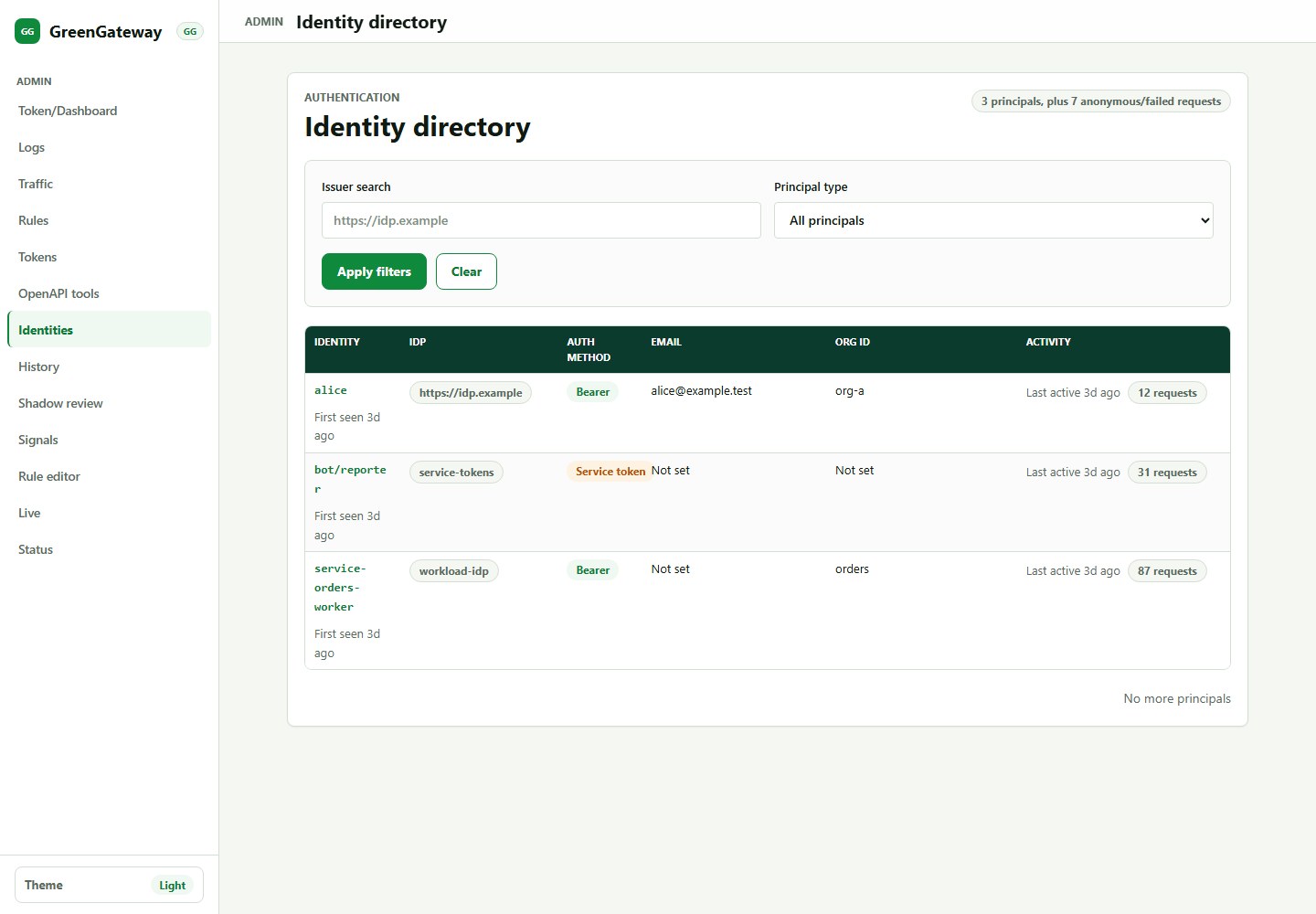
12. Analyze identities

Identity Directory lists stored authenticated principal observations when principal persistence is enabled. It helps answer which subject, issuer, and auth method touched traffic before you write principal-specific rules.

Requires: configured authentication, PRINCIPAL_SQLITE_PATH, traffic from authenticated callers, a restarted gateway after config changes, and admin:principals:read.

  1. Set PRINCIPAL_SQLITE_PATH in the gateway environment and restart GG.
  2. Open /admin/identities, or choose Identities from the sidebar.
  3. Filter by issuer or principal type when reviewing identity scope.
  4. Open a principal detail page to see endpoints, rules, signals, and tools for that identity.
  5. If the page is empty, confirm authenticated traffic has traversed the gateway and check Logs for anonymous or failed requests.

Rule analysis use

Identity review complements Logs and Traffic Detail when deciding whether a rule should match a broad role, a single subject, or an auth method such as service token.

GreenGateway identities page showing demo observed principals and recent activity
Identities: demo data shows observed users, service accounts, issuers, request counts, and recent activity.

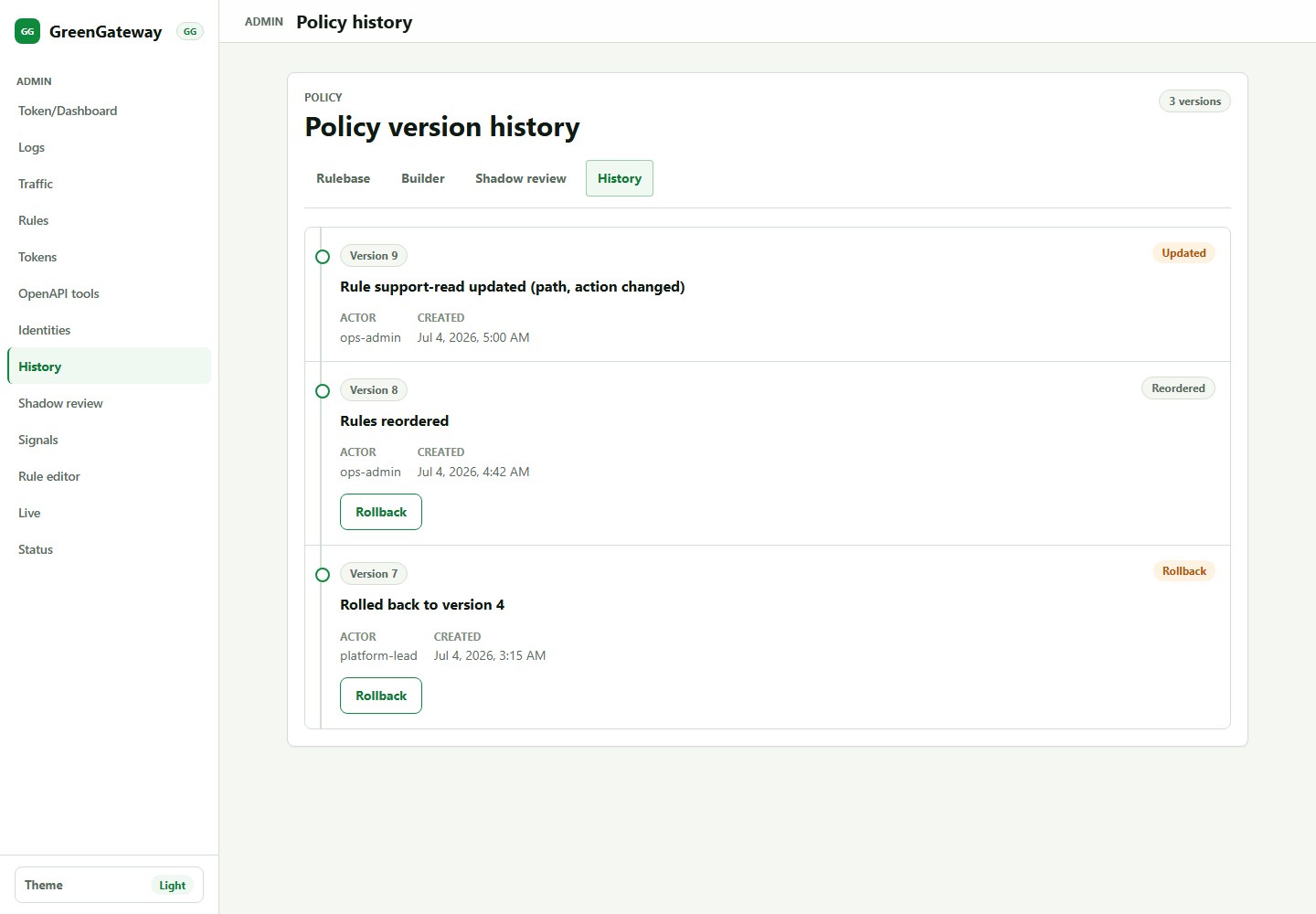
13. Review policy history

Policy History records available policy mutations with actor attribution, timestamps, diff summaries, and rollback actions when policy history is configured.

Requires: policy read permission. Rollback requires policy write permission and creates a new policy mutation rather than deleting history.

  1. Open History before debugging a sudden allow or denial.
  2. Choose the target version by actor, timestamp, and diff summary.
  3. Compare the current policy intent against the target version and identify affected rules.
  4. Confirm blast radius, rollback owner, and verification window before selecting rollback.
  5. After rollback, verify the new history entry, Rule Table state, and Live Tail/Logs behavior.

Rollback discipline

Rollback is a policy write. After rollback, check Rule Table, preview critical rules, and watch Live Tail for recovery evidence.

GreenGateway policy history page showing demo policy versions and rollback controls
Policy History: demo data shows policy versions, actors, change summaries, results, and rollback-oriented controls.

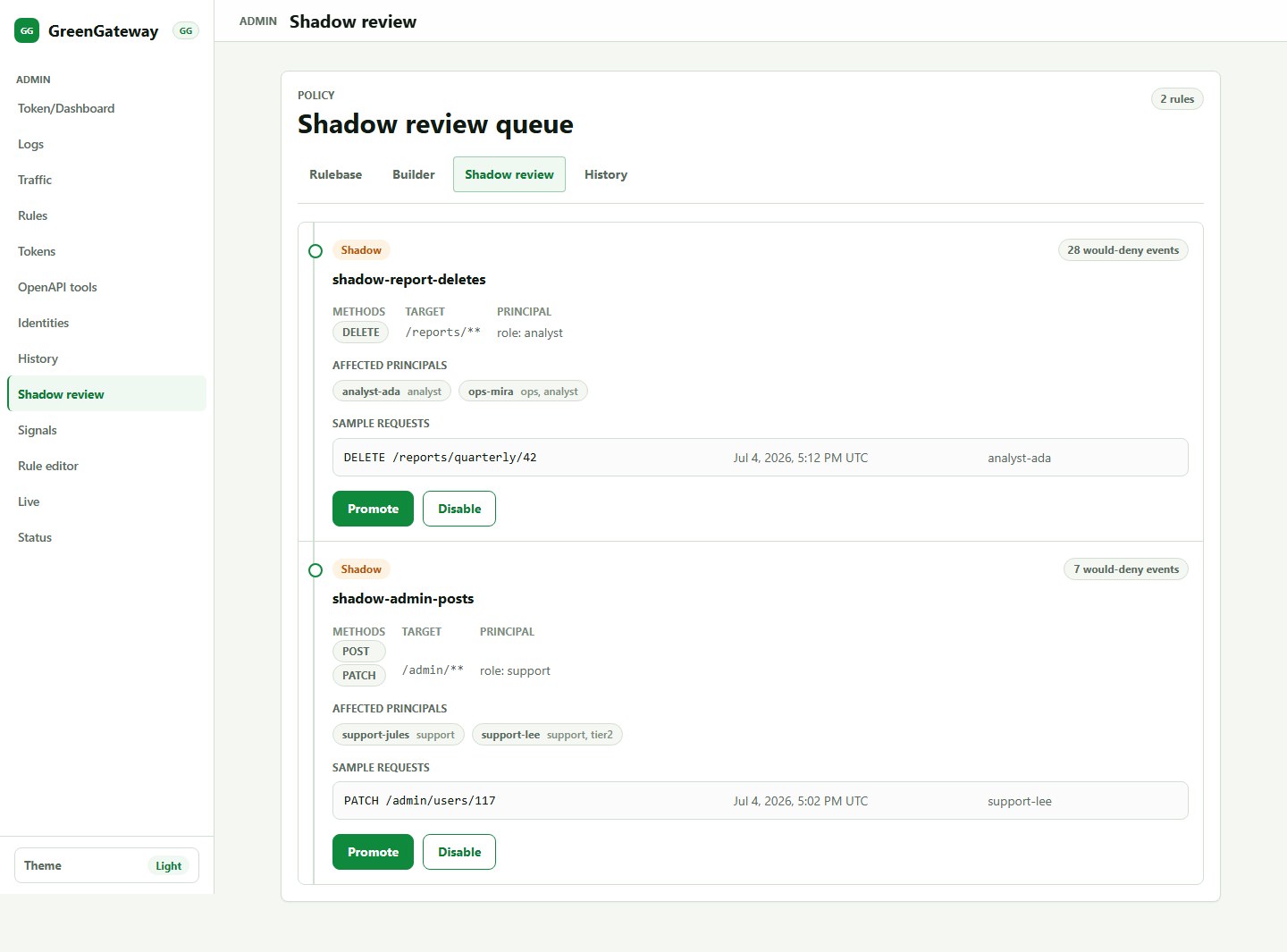
14. Promote or disable shadow rules

Shadow Review aggregates real would-deny evidence for rules with action: "shadow". It shows counts, affected principals, and sample requests so operators can decide whether to enforce or abandon a candidate restriction.

Requires: at least one enabled shadow rule, matching traffic, audit/discovery data, and permission to read shadow review evidence. Promotion or disable actions require policy write permission.

  1. Review would-deny counts, affected principals, representative samples, and recent related logs.
  2. Promote only after confirming owners, expected service accounts, business-critical paths, rollback owner, and monitoring window.
  3. If the rule is noisy, decide whether to disable it, narrow its principal/path/method scope, or rewrite it as a safer shadow rule.
  4. After promotion, monitor Live Tail and Logs for unexpected denials.

Recommended rollout

For production changes, prefer shadow first, then promote after evidence shows the rule is safe.

GreenGateway shadow review page showing demo shadow rules with would-deny evidence
Shadow Review: demo data shows would-deny counts, affected principals, representative samples, and promote/revise decisions.

Feature Reference

Feature What it does How it works Primary use
Token dashboard Stores the operator bearer token for the browser session. Uses the same auth header helper as every admin API call. Access protected admin views.
Status Displays running gateway configuration and health indicators. Reads the protected admin status endpoint. Confirm feature dependencies and active security settings.
Log Explorer Queries historical audit events. Filters SQLite-backed audit history with keyset pagination. Investigate decisions and build evidence for rules.
Live Tail Streams live audit events. Consumes the admin SSE event stream. Watch test traffic and immediate policy effects.
Traffic Inventory Lists discovered endpoint templates. Aggregates observed request events off the request hot path. Find endpoints needing review, ownership, or rules.
Traffic Detail Shows one endpoint's metrics, principals, history, and context. Combines discovery aggregate data with audit enrichment. Design endpoint-specific rules.
Rule Table Shows and mutates direct firewall rules. Uses protected policy CRUD APIs with ETag guarding. Review, reorder, enable, disable, and delete rules.
Rule Editor Creates or edits rules with live preview. Builds a candidate rule and evaluates it against historical traffic. Create narrow, evidence-backed policy changes.
Signals Lists deterministic anomaly signals. Signal detectors run from discovery aggregates and emit lifecycle events. Prioritize suspicious or newly discovered behavior.
Tokens Creates, revokes, and rotates service tokens. Stores token hashes and only returns plaintext once. Grant machine access with narrow scopes.
OpenAPI Tools Converts OpenAPI operations into MCP tool definitions. Previews/registers generated tools from an OpenAPI document. Expose API operations as governed MCP tools.
Identities Shows authenticated users and bots seen by the gateway. Persists principal observations asynchronously when enabled. Design identity-aware rules and investigate principal behavior.
Policy History Displays policy versions, actors, diffs, and rollback controls. Appends version records on every policy mutation. Audit and recover policy changes.
Shadow Review Aggregates would-deny results for shadow rules. Reads direct-rule shadow enforcement evidence from audit/discovery data. Promote safe restrictions without guessing.

Admin Permissions

Admin pages are not automatically available to every authenticated operator. The token's roles must map to the permissions needed by the API behind the page.

Page or action Typical permission Failure symptom
Read logs, live events, status Admin read permissions for audit/status/events routes Bearer token required, unauthorized, or forbidden message.
Read and mutate policy rules admin:policy:read, admin:policy:write Rule writes disabled or mutation error after save.
Read identities admin:principals:read Principal directory permission required.
Manage service tokens admin:tokens:read, admin:tokens:write Token permission required or write controls disabled.
Register OpenAPI tools Tool registration/write permission from policy Preview may work while register actions are blocked.

Junior operator rule

A 403 in the admin UI is a policy result, not a frontend crash. Check the current token roles, the policy role definitions, and the route permissions before changing code.

Rollout Checklist

New organization onboarding

  • Configure IdP or service-token authentication.
  • Enable audit storage before running real traffic.
  • Enable discovery storage for endpoint inventory and signals.
  • Generate or mirror representative traffic.
  • Review endpoint owners and principal access.
  • Create baseline allow rules from evidence.
  • Use shadow rules for uncertain denials.
  • Move toward deny-by-default once coverage and recovery are proven.

Rule change checklist

  • State the business reason for the rule.
  • Confirm target endpoint or tool name.
  • Confirm expected principal roles or subjects.
  • Preview against historical traffic.
  • Prefer shadow for uncertain restrictions.
  • Save, then verify in Policy History.
  • Watch Live Tail and Logs after rollout.
  • Rollback if legitimate traffic is blocked.

Troubleshooting

Symptom Likely cause Action
Bearer token required No token saved in the browser session. Open Token dashboard, paste a token, save, and retry.
Token valid but permission required The role is authenticated but lacks the admin permission for that API. Update policy role permissions or use a correctly scoped operator token.
Traffic inventory is empty No discovery database, no observed traffic, or filters are too narrow. Set DISCOVERY_SQLITE_PATH, generate traffic, and clear filters.
Logs are empty No audit database or no matching filter results. Set AUDIT_SQLITE_PATH, generate traffic, widen filters.
Identities are unavailable Principal store is disabled or operator lacks read permission. Set PRINCIPAL_SQLITE_PATH and grant admin:principals:read.
Token management unavailable Service-token store disabled or missing token permissions. Set SERVICE_TOKEN_SQLITE_PATH and grant token read/write permissions.
Policy save conflict The policy changed after the page loaded. Reload policy, compare changes, and save again only if the intent still applies.

Glossary

Term Meaning
Principal The authenticated user, bot, or service account associated with a request.
Endpoint template A normalized path shape such as /users/{id} learned from concrete request paths.
Direct firewall rule A policy rule that matches proxied API or MCP traffic and applies allow, deny, or shadow.
Shadow rule A rule that records what would have been denied without blocking the request.
Signal A deterministic discovery finding that suggests unusual or newly observed behavior.
ETag A version guard used to prevent policy writes from overwriting concurrent edits.